50 University Icons for Modern Design
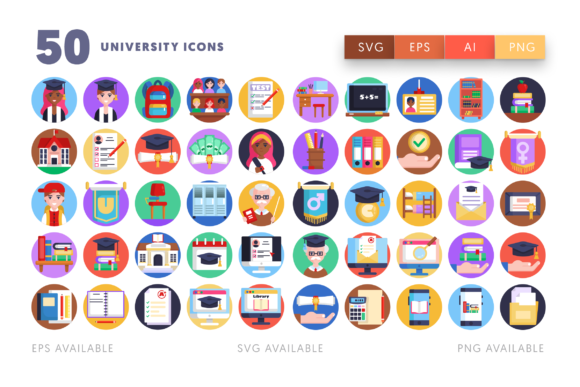
Elevating educational branding requires more than just text; it demands a visual language that speaks directly to students, faculty, and alumni. The 50 University Icons collection serves as a vital toolkit for designers aiming to create cohesive and professional academic identities. By integrating these versatile symbols into your workflow, you can streamline the design process while ensuring high-quality output across various media platforms.
The Importance of Visual Consistency in Education Branding
In the competitive landscape of higher education, a strong brand identity is crucial. Whether you are designing for a prestigious university, a local college, or an online learning platform, consistency builds trust. These icons provide a unified aesthetic that helps maintain visual hierarchy and clarity. From admission brochures to digital dashboards, having a standardized set of graphics ensures that your message remains clear and impactful.
Graphic design is not merely about decoration; it is about communication. Using specialized assets like the 50 University Icons allows creators to convey complex ideas—such as graduation, research, or campus life—quickly and effectively. This efficiency is essential in today’s fast-paced digital marketing environment, where attention spans are short and visual appeal is paramount.
Versatile File Formats for Every Design Workflow
One of the standout features of this collection is its adaptability. Designers work with diverse software and requirements, and having the right file format can save hours of preparation time. This package includes multiple formats to suit any creative project:
- 1 Ai file: Easy to customize in Adobe Illustrator, allowing you to change text, color, and size effortlessly.
- 1 EPS file: Compatible with most vector design programs, ensuring broad usability.
- 1 SVG file: Perfect for web and UI design, easily opened in Sketch, Inkscape, or other vector editors.
- 512 x 512 px icons: High-resolution raster images that are easy to resize and adapt for social media or presentations.
- Separate files: Includes 50 EPS, 50 SVG, and 50 PNG files for individual icon usage.
This flexibility supports a seamless design workflow, whether you are working on print design materials like posters and banners or digital products such as mobile apps and websites. The ability to modify colors and sizes means these icons can align perfectly with any existing brand palette or typography scheme.
Practical Applications for Creative Projects
The utility of these icons extends far beyond simple decoration. They are powerful tools for enhancing user experience and engagement across multiple channels. Here are several ways designers can leverage this collection:
Digital Marketing and Social Media
Social media graphics require eye-catching visuals that communicate instantly. Use these icons to highlight key information in Instagram stories, Facebook posts, or LinkedIn articles. For instance, a "library" icon can anchor a post about study resources, while a "graduate" cap symbol can celebrate alumni success stories. This approach improves readability and encourages interaction.
Website and UI Design
In web design and UX design, icons serve as navigational aids. They help users scan pages quickly and find what they need without reading dense text. Incorporating these university-themed icons into menus, buttons, and feature sections can significantly improve the user interface. Their clean lines and modern aesthetics ensure they look sharp on both desktop and mobile screens.
Print and Editorial Design
For printed materials such as course catalogs, annual reports, or event programs, these icons add a professional touch. They can break up large blocks of text, illustrate specific departments, or serve as decorative elements in headers and footers. The high-quality vector files ensure that prints remain crisp and clear, regardless of the size.
Tips for Effective Icon Usage
To maximize the impact of these creative assets, consider the following best practices:
- Maintain Consistency: Use icons from the same set to ensure a uniform look. Mixing styles can create visual clutter and confuse the audience.
- Prioritize Readability: Ensure icons are large enough to be recognized but not so dominant that they overshadow the text. Balance is key to effective visual communication.
- Align with Brand Identity: Customize the colors of the icons to match your institution’s brand guidelines. This reinforces brand recognition and creates a cohesive experience.
- Consider Context: Choose icons that accurately represent the content they accompany. A mismatched icon can lead to misunderstanding and reduce credibility.
By thoughtfully integrating these elements, designers can create compelling narratives that resonate with their audience. The right visual choices enhance the overall quality of the project, making it more engaging and memorable.
Ultimately, investing in high-quality design assets like the 50 University Icons is an investment in effective communication. They provide the foundation for creating polished, professional, and visually appealing materials that stand out in the educational sector. Whether you are a seasoned designer or a marketing professional, these tools offer the flexibility and quality needed to bring your creative vision to life.